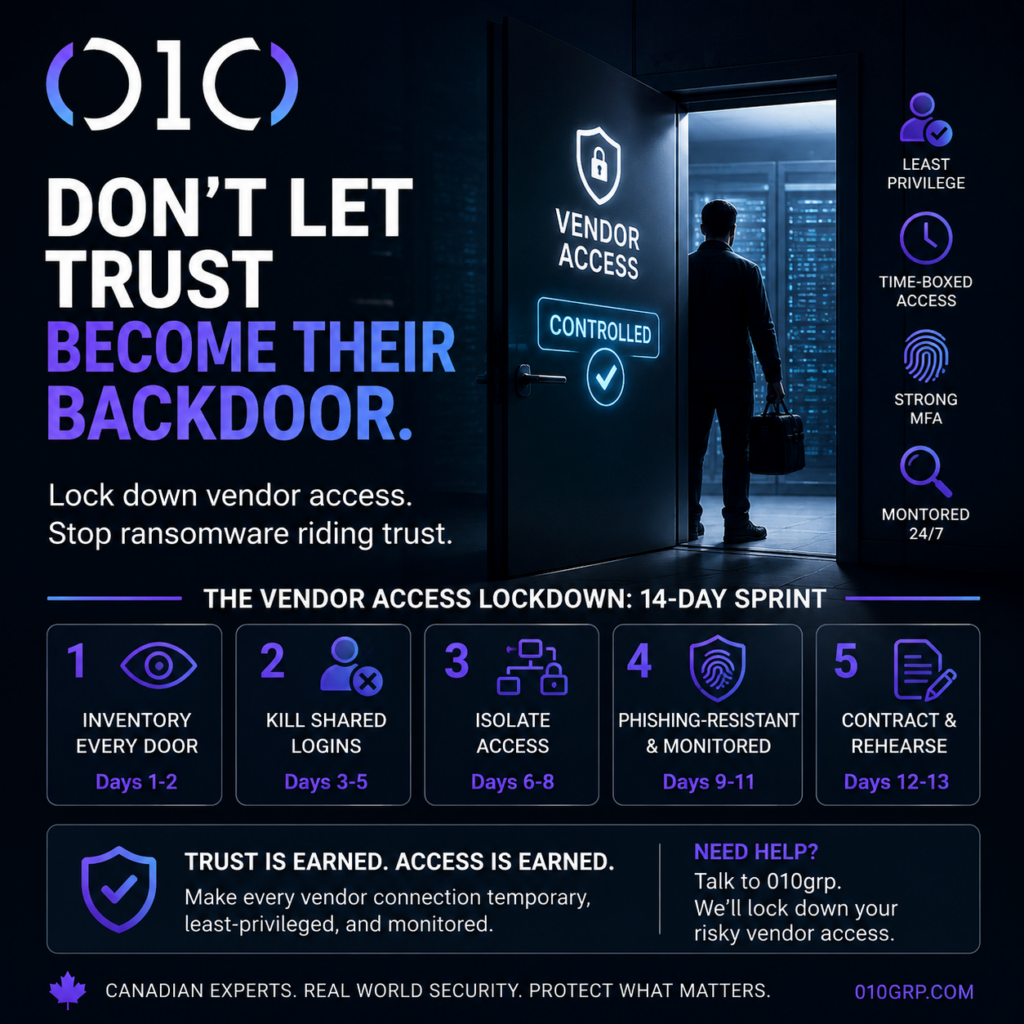
Here’s the uncomfortable truth: most “third‑party access” in Canadian SMBs is not controlled access – it’s a standing invitation. The vendor who “just needs VPN for support” ends up with broad admin rights, long‑lived passwords, and no one watching what they do. Attackers love that because they don’t have to break in. They borrow trust. This is how you stop ransomware riding trust.
In Ontario manufacturing, accounting, and healthcare clinics, we still find vendor passwords in shared inboxes, plus VPN profiles copied between technicians every week.
This is why supply‑chain intrusions and MSP tool abuse keep showing up in real incidents. If you read Your MSP Tool Is a Skeleton Key, you already know the pattern: compromise one remote tool, inherit many clients. The myth we hear constantly is “our vendor is reputable.” Reality: reputable vendors still have breached staff, reused credentials, and rushed technicians. Risk lives in the connection, not the logo.
3 red flags your vendor access is already risky
- You have a firewall rule called “VendorVPN” and nobody can explain what systems it reaches.
- The vendor can log in whenever they want, and the only “audit trail” is an email thread.
- You would struggle to disable vendor access in 10 minutes during an incident.
The Vendor Access Lockdown: a 14‑day sprint
This is the playbook we run at 010grp when leadership wants results fast. It aligns with the Canadian Centre for Cyber Security’s guidance on cyber supply chain security for small and medium organizations, but it’s written for the messy reality of “we have five vendors and nobody owns it.”
Days 1-2: inventory every door you forgot existed
- List every vendor connection: VPN accounts, RDP jump hosts, firewall rules, SaaS integrations, API keys, service accounts, and RMM agents.
- Map each one to a business owner. If Finance relies on a vendor portal, Finance owns the risk.
- Delete what you can’t justify. Old vendors become permanent backdoors.
Days 3-5: kill shared logins and “vendor admin” habits
- Replace shared credentials with named accounts. Every action must map to a human.
- Strip privileges to the minimum needed. If the vendor only supports one server, they do not need domain admin.
- Move admin activity off daily workstations. If you want the fastest way to stop breach multiplier privileges, follow our PAM in 30 days plan.
Days 6-8: isolate vendors from the rest of your business
- Put vendor access through a controlled jump box, not direct access to production.
- Segment networks so a vendor session cannot “see” file shares, backups, or identity infrastructure. Start with the zone approach in Flat Network? Canadian SMBs Are One Click From Ransomware.
- Time‑box access. If support is 9-5, access should be 9-5.
Days 9-11: make vendor logins phishing‑resistant and monitored
- Require strong MFA for vendors and admins. Better yet, move toward phishing‑resistant methods (hardware keys or certificate-based sign‑in) where possible.
- Restrict by context: allowed countries, device posture, and IP ranges. “Anyone, anywhere” is not support – it’s exposure.
- Centralize logs and alert on the ugly events: new admin roles, remote tool deployment, mass file changes, disabled security controls, and suspicious mailbox rules.
Days 12-13: put security into the contract, then rehearse
- Add clauses: MFA required, least privilege enforced, breach notification timelines, and subcontractor restrictions. The Cyber Centre’s secure cloud and outsourced IT services guidance is a solid baseline for expectations.
- Run a tabletop: “vendor account compromised on Friday night.” If you’ve never practiced, read Breached? Do This in 72 Hours or Pay Twice and then actually rehearse it.
Canada‑specific reality: vendor breaches become reporting problems
If a third party compromise exposes personal information, you can quickly land in mandatory breach reporting territory. Start with the Office of the Privacy Commissioner’s guide on mandatory reporting of breaches of security safeguards. If you operate in Québec or handle Québec residents’ data, the CAI’s guidance on confidentiality incidents under Law 25 raises the bar. The fastest way to reduce legal pain is to reduce blast radius and preserve evidence.
Where 010grp fits
Tool sprawl won’t save you. Vendor access control is a system: IAM, MFA, PAM, network segmentation, 24/7 monitoring, and an incident response process that works under pressure. If you want a framework to anchor this work, NIST’s SP 800‑161 supply chain risk guidance is worth skimming – but you still need execution.
Your action for this week: pick your riskiest vendor connection and make it temporary, least‑privileged, and logged. If you can’t, call 010grp. We’ll show you exactly which vendor doors to close first, and how to keep them closed.